|

|
||||||||||||||||||||||||||||||||||||||||||||||||||||
|

OverviewWhether you're on a short trip to Thailand, working with Thais, or studying the Thai language in-depth, this is the one dictionary you can really use. Nothing else even comes close!
 Key Features

Phrasebook vs. DictionaryHaving trouble deciding whether to purchase our phrasebook or dictionary app today?See our phrasebook and dictionary app product comparison. Buy with confidence: as explained in our comparison page, with either purchase today, you will be able to upgrade to get the full functionality of both apps.
Useful VocabularyWhether you are visiting Thailand for a short while or living there, you will find most of the vocabulary used in everyday life, including basic medical, cultural, political and scientific terms. Enjoy an astounding 195,000+ entries, plus an additional 53,000 place name entries (not counted above) that help you to pinpoint geographical locations in Thailand. Plus a built-in phrasebook with 12,000+ entries organized into more than 300+ useful categories.
300+ Useful CategoriesThis 195,000-entry dictionary also features a built-in phrasebook. Our 12,000+ phrasebook entries are organized into more than 300+ practical categories like
Tap here to see full list of categories.
Unlike other dictionaries and phrasebooks that simply give you lists of nouns, our phrasebook features many hand-crafted categories with complete, ready-to-use sentences for real situations you will encounter while traveling or living in Thailand, showing both questions and answers so that you and a Thai person can use the phrasebook to communicate together:
Plus our phrasebook also contains categories for key lists of related words that are useful to learn at the same time, including colors, numbers months, days, body parts, family roles, languages/nationalities, Thai provinces, Thai classifiers/measure words, and more. These categories are great alongside our included comprehensive, interactive guide to speaking and understanding Thai. Using the Search screen you can find thousands of everyday useful words, including basic medical, cultural, political and scientific terms.
Customizable Super PhrasesUnlike traditional phrasebooks and apps that give you limited phrase choices (e.g. "Take me to the bus station" but not "Take me to the airport," or "I will arrive at 2:00" but not "I will arrive at 3:30 on Friday") our app features hundreds of industry-first super phrases, which let you customize part of the phrase to your needs and get instant translation and playback of the full sentence in Thai, complete with a talking, translating calculator, currency conversion, and units conversion built right in the phrases themselves!For example, you can haggle with a vendor in your language and your currency and instantly convert to hers so she understands you. Here is a phrase from our "Price Haggling" category that lets you ask for a discount:
If you want to ask for a different amount of money off, simply touch the "50 THB" and you will get this screen:
Here you can use our built-in talking, translating calculator to type or calculate any number you want. Notice how we show multiple currencies so you can type the currency you are familiar with (e.g. your home currency) and get instant conversion and translation to all other currencies (e.g. the vendor's currency). You can even touch the play button to speak any money amount in Thai. Finally, touch "Choose" and you will be returned to your original phrase with your new money amount filled in. You can then touch the play button to say the entire phrase (with your new money amount) to the vendor. Super phrases aren't just for money. Our app can convert distances (e.g. miles, kilometers, meters, feet), temperatures, speeds, volumes (e.g. cups, liters; useful for cooking and ordering materials), weights (e.g. kilograms, pounds, and Thai market units), and even areas (e.g. acres, hectares, and even the Thai land unit of rai, which is invaluable when looking for land):
We support every unit you might need and you can even make a convenient "short list" of frequently-used units. Covers all your needs when buying at the market or the shop. Our dictionary also features many super phrases where you can customize your own date, time, or time period/interval. This is invaluable when you are booking a plane, bus, or train ticket, or making a date to get together again with your new Thai friend. Super phrases aren't just for numerical quantities and dates either. For example, many super phrases such as "I want to take a taxi to ..." and "Which bus goes to ..." let you choose a custom place from a huge, organized menu of common destinations, including places like "my hotel," "the airport," major Thai cities, and the most common tourist destinations across Thailand.
Other super phrases help you shop (e.g. "I want it in ..." where you can choose your desired color or size), order food (e.g. "Please make it ..." where you can choose from totally non-spicy to local-person spicy, and "I cannot eat ..." where you can choose from common sensitive foods like gluten and MSG), and even deal with health emergencies: super phrases help you communicate your symptoms with doctors and report problems to police. And for each of these types of phrases, you can browse the complete list of choices (e.g. colors, spiciness, foods) and learn a whole set of useful related words at once.
Organize your FavoritesOur Favorites screen lets you organize the words and phrases you use often into multiple folders (you can even have folders inside folders, as deep as you want):
Use the Favorites screen to prepare the phrases you will need for a trip or errand, organize study lists of words you want to learn, or even put together a whole sentence or paragraph which you can touch to play all at once. Using our simple and intuitive interface, you can easily select multiple items, and move, copy, and organize your favorites as you please. Make changes with peace of mind, knowing you have 30 levels of Undo and Redo available.
Talks for You with a Fluent Native VoiceYou can touch any Thai word, phrase, or complete sentence in the dictionary to hear a high-quality sound recording of a native Thai speaker. Tap the buttons to hear some sample sounds:
The app includes almost 30 hours of studio-recorded sound! Say goodbye to toneless, gravelly robot voices and limited sound sets: our comprehensive sounds set a new standard in the industry.
Use Without an Internet ConnectionWorks even when you're in a taxi or a countryside street market and not connected to the internet: all entries and sounds are stored right on your device, and you will incur no data charges when you use the app.For more details, see requirements. When online, you or your Thai friend can even speak English or Thai words right into your device to search the dictionary (see dictation requirements).
Big Text and Clear, Sensible LayoutEnjoy a clean layout that lets you scroll through multiple, complete entries on the screen at once. No need to tap to open each entry and tap back again.
Best of all, you can make the Thai and English text (separately or together) as big as you want—no more reading glasses!
Learn Real-World Thai ScriptYou've probably noticed that the Thai letters appearing on signs and menus in Thailand often look nothing like what you learned in textbooks. A unique new feature of our dictionary is that you can tap on any Thai word and see that word written in a set of real-world fonts that you are likely to see on signs, menus, documents, and even in Thai handwriting. It's an indispensable feature for getting around the country:
Find Words InsideTouch any Thai word to see all the other dictionary words contained inside it. This fun and innovative feature is great for learning how complex ideas are expressed in Thai, and learning new words too!
Explain SpellingWith our ground-breaking "Explain Spelling" feature, you can crack the code of Thai Script. "Explain Spelling" goes hand-in-hand with the comprehensive language guide also included with this software, which introduces all the written symbols of Thai.Touch any Thai word to call up a visual explanation of its Thai Script spelling that shows you how the vowels and consonants of each syllable fit together, and how to determine each syllable's tone:
Each of our explanations provides links to the relevant section of our language guide so you can quickly learn Thai Script. Nothing like this has ever appeared in any dictionary software on any platform.
Full-Screen on all DevicesFull, native support for the larger iPhones and all iPads:
Instant SearchAs you type the word you're looking for, the dictionary instantly jumps to the nearest word. You can often find your word by typing only a few letters:
Full-Text Power SearchOur app supports Full-Text Power Search, meaning that when you search for a word, we find all phrases that contain your word anywhere in the phrase, not just at the beginning:
This feature makes finding the phrase you want (and its related categories) a snap: you only have to enter one or two key words. Amazingly, our Full-Text Power Search feature even searches inside super phrases, meaning that it can even customize a phrase to meet your search requirement, as seen above. You can search for prefixes of words (for example, searching for "book" finds not only "book" entries but also "bookshelf" and "bookstore"). This even works for Thai Sound searches (e.g. "nih" can find "nihao"), which saves you time and is useful when you can only remember the beginning of a word. You can search for multiple search terms and our dictionary will find entries containing all of those terms, even if they are not next to each other in the phrase. For example, "taxi airport" finds useful phrases like "I want to take a taxi to the airport." Your search terms can even mix English, Thai Script, and Thai Sound in any way you want, which is very useful in cases where you know part of the English meaning and part of the Thai, e.g. "noodle p:si" finds:
When using Search-by-Sound™ to find Thai words by their sound, you can find all words with your specified consonants and vowels regardless of tone, or if you know the tone you can restrict your search to certain tones. You can also choose the traditional Alphabetical Search mode seen in the 1.x verisons of our apps, which lets you search into and scroll through a full alphabetical list of all words in each section.
Pronunciation GuidesEvery single Thai word is accompanied by an easy-to-read, English-like Thai Sound pronunciation guide (also known as "Transliteration" or "Phonetics"), so you can learn to speak and recognize Thai words immediately, without needing to learn Thai script. Our pronunciation guides give you the tones and everything else you need to understand and to be understood.We even let you choose which pronunciation guide system you want to use from a list of 12 popular systems. With a single touch in our app settings screen, all pronunciation guides throughout the app transform into your chosen system, and you can even look up Thai words by sound using your chosen system. For those more advanced users who are trying to wean themselves off of pronunciation guides and onto Thai script, we even offer the option to temporarily hide pronunciation guides until you touch to reveal them.
We Go Three WaysThis dictionary goes three ways!
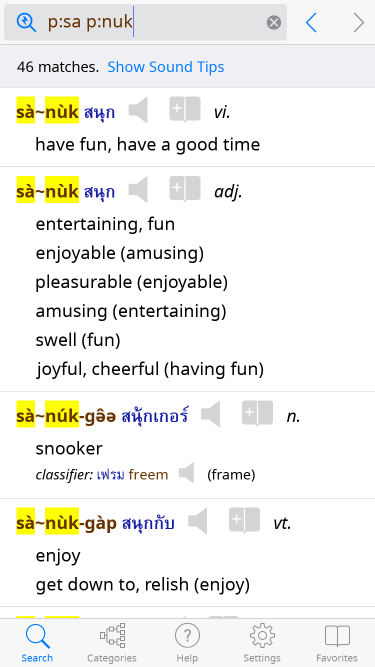
Most dictionary and phrasebook apps let you look up English words, and some also let you look up Thai words using Thai script. But Paiboon's revolutionary three-way design bridges the gap for English speakers by introducing a third option where you can Search-by-Sound™: you can look up Thai words that you hear by their sound using the same easy-to-read pronunciation guide. Hear someone say "sa nuk?" Type "sa nuk" to find out what it means:
Search-by-Sound™ has been a hallmark of all Paiboon dictionary and phrasebook products since Paiboon's first Thai products in 2002. For more information on Search-by-Sound™ and why it's so useful for Thai, see this section.
Multiple Pronunciation SystemsIn addition to our signature Paiboon+ pronunciation guide system, the same system used in all Thai learning materials from Paiboon Publishing, this software lets you choose from 11 other pronunciation guide systems:
With a single touch in our app settings screen, all pronunciation guides transform into your chosen system, and you can even look up Thai words by sound using your chosen system.
Explain Sound"Explain Sound" makes it even easier to learn the pronunciation guide systems that underly Search-by-Sound™ and get the most out of Thai sound search. For any Thai word/phrase you choose in the whole app, or any Thai text you type into Thai sound search, we show you detailed, interactive information on how to pronounce the vowels, consonants, and tones of that word/phrase:
The description has clickable speakers to hear sounds and has many links that take you directly to the relevant sections of our comprehensive, interactive guide to both speaking/understanding Thai if you want to learn more. With one touch you can even hear nearby Thai sounds that would give the word a different meaning, which is the key to clearly speaking and understanding the Thai language. "Explain Sound" is even available when you are typing text into Thai sound search, meaning you can instantly see what the text you have typed sounds like, and make quick changes if you really wanted to type a different sound. This helps you rapidly learn your chosen pronunciation guide system.
Introduction to ThaiOur app includes a comprehensive, interactive introduction to the Thai language, including a "Speaking and Understanding" section with clickable sounds, and a "Reading and Writing" section with examples of Thai letters in multiple, real-world fonts.Sample Topics:
Here is an example from our section on Tones:
Designed for English SpeakersUnlike typical dictionaries and phrasebooks based on free, often low-quality data meant for Thai natives, our superb Paiboon Publishing dictionary entries are hand-crafted by a team of Thai- and English-native editors with your needs in mind.Entries are richly annotated for native English speakers so you know the exact meaning of each Thai word and phrase you use (for example, the entry for "glass" clarifies "drinking glass" vs "pane of glass," which translate differently in Thai) including slang and formal variants.
No more Google Translate gibberish! ClassifiersClassifiers are a critical part of Thai grammar, needed for even basic usage. Our dictionary provides crucial classifiers for more than 60,000 noun entries—a first in the industry. Our language introduction tells you how and when to use them.
Convenient NavigationAs you are reading any dictionary entry, you can tap on any Thai or English word in that entry to search for that word or activate a wide range of other amazing features. This can be a great way to explore different shades of meaning and learn new, related words.Also, you can tap on any part of speech or other symbol to go directly to the relevant section of our language guide to learn more. As you look up words, help pages, or use the other special features of our app, you can always touch the back button to get back where you were, just like a web browser.
You can bring up a history screen showing the last 40 places you have been, and (version 2.0 and above) clear your history for privacy. And of course with our favorites screen you can save and organize entries into multiple folders for as long as you want.
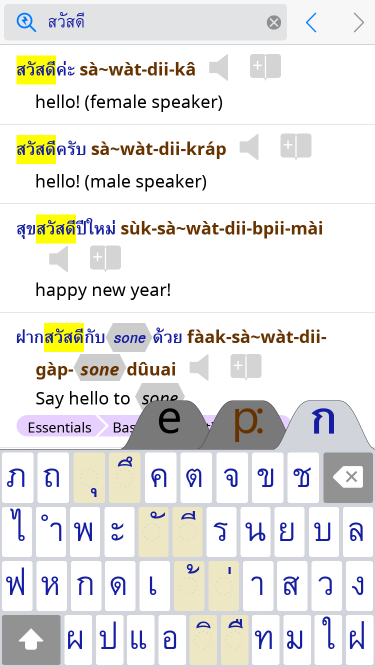
Customize KeyboardsWith our dictionary, you can choose either system keyboards (Apple keyboards or third-party keyboards like Swype), or you can choose the built-in specialized, custom Paiboon keyboard, which is exclusive to our app. The Paiboon Keyboard features large, readable key labels and only presents the keys you need for searching in the dictionary.Our Paiboon Thai Script keyboard's large, clear labels are a dream come true:
The Paiboon keyboard frees you from typical Thai keyboards that have tiny labels that are nearly impossible for non-Thais to read, and include several obsolete "decoy" letters not used for any word in modern Thai (especially ฃ ฅ ๅ) that look almost exactly like common letters (ข ช ซ ค ด ต า) and often lead to failed searches (for more see this FAQ item). Our keyboard also features large key labels that match your chosen entry font exactly, making it easier to find the letter you want. Our app even supports external Bluetooth keyboards.
Customize LayoutIn addition to making the text as big as you want and choosing your own keyboard, you can also choose from multiple different English and Thai fonts and configure other aspects of definition layout in our Settings screen.For those who prefer to fit the most information possible on-screen, we even offer an alternate compact layout. Here is an example with the compact layout and customized fonts:
Copy Whole EntryWith a minimum of touches, easily export one or more complete entries (with Thai, English, part of speech, etc.) from our app into popular flashcard programs that support the very common "CSV" format, such as Anki or Mental Case. Or export entries to a spreadsheet to create your own study sheet.
Auto Paste and SearchIf you frequently look up words you copied from other apps, this feature saves you tons of touches by automatically looking up any word that is in the clipboard the instant you switch to our app.External LinksFor any English or Thai word in the entire app, you can turn on a button that appears right next to that word and looks up that word in an external website like Google, Google Images, Wikipedia, and online Thai and English dictionaries, or any other search-oriented website you choose. Enable up to four different external websites to quickly reach the ones you use most often for each language.
Custom URL SchemeUsing our paiboonthdc: Custom URL Scheme, you can automatically launch our app from other apps or even from documents you create yourself, such as study sheets. Your link can jump to individual words, categories, or Favorites pages within our app for instant lookup or playback.
Search-by-Sound™Search-by-Sound™ is what puts Paiboon Publishing's dictionaries and phrasebooks so far ahead of the competition, and now this indispensable capability is available on your device.
The ProblemAs you may know, Thai has its own alphabet which is nothing like English and takes a long time to learn. And even if you know the Thai alphabet, there are multiple ways of writing the same sound. For example, there are 4 letters that sound like an "s," 5 letters that sound like a "k," and 6 letters that sound like a "t"! So, looking up a Thai word that you hear is difficult even for a seasoned scholar.
The Solution: Search-by-Sound™What if you could simply look up what you hear? Search-by-Sound™, a hallmark of all Paiboon dictionaries and phrasebooks since Paiboon's first Thai product in 2002, lets you do just this.It all starts with pronunciation guide systems. Paiboon Publishing has developed an easy-to-use pronunciation guide system called "Paiboon+," which spells out Thai words using English-like letters. With Paiboon+, there is just one simple way to write each sound. There are other pronunciation guide systems too, and if you're already familiar with another system, our app lets you choose from amongst 12 different systems in use today. Every Thai word in our dictionary is written with the Thai alphabet and also with your chosen pronunciation guide systems. But Search-by-Sound™ takes that one step further: you can look up a Thai word by its pronunciation guide. For example, if you hear someone say "sa nuk," you just type "sa nuk:"
The app provides you with the exact pronunciation, the word written using Thai script, the definition, and you can even touch to hear a high quality sound recording of a native Thai speaking that word.
Conquer Those Terrible TonesThai is a tonal language: in addition to having particular vowels and consonants, each syllable has a particular pitch contour (middle, low, falling, high, or rising). When you listen, you must recognize those tones to fully understand. When you speak, you must use the tones to be understood. Needless to say, this is often hard for native English speakers.Search-by-Sound™ makes this much easier by allowing you to search for a word without needing to know its tones. You can then look at all the possibilities and choose the correct meaning from context. Throughout our app, Thai words are always shown in both Thai script and using a pronunciation guide. So, if you look up an English word, you can rely on the pronunciation guide to help you pronounce the word correctly and be understood.
Paiboon Publishing The
Talking Thai <> English Dictionary+Phrasebook was developed by
Paiboon Publishing
and Word in the Hand™ Inc. The
Talking Thai <> English Dictionary+Phrasebook was developed by
Paiboon Publishing
and Word in the Hand™ Inc.Paiboon Publishing is the world's leading producer of South-East Asian language learning materials, including the famous Thai for Beginners and the Thai for Beginners App. There's even an audio companion to the learning books, a guide to pronunciation, and a multi-volume series on how to Speak Like a Thai. Paiboon Publishing also created leading offerings for the Burmese, Vietnamese, Lao, and Cambodian languages. Paiboon Publishing has recently expanded into the Chinese language learning space with disruptive apps full of industry-first innovations, such as the Talking Chinese–English–Chinese Phrasebook and Survival Chinese for English Speakers. The Talking Thai <> English Dictionary+Phrasebook and Paiboon's other Thai language materials, both printed and electronic, work perfectly together because they share a common teaching method and a common set of pronunciation guide systems (for more detail on pronunciation guide systems, see Search-by-Sound™). If you have a mobile device, don't miss out on this indispensable Thai learning app from Paiboon Publishing:
and Dominique Mayrand Buy Now for iPhone/iPad/iPod Touch from the Apple iTunes App Store Buy Now for Android from the Google Play Store Learn Thai from Thai language expert Benjawan Becker Version 2.0 features include: Increase text size: small, medium, large; autoplay an entire lesson; show or hide English text; added English voice, which can be turned on or off. Teaches speaking, listening and reading Thai with a native speaker and over 3,000 clearly recorded words and phrases. Follows the format of the best selling Thai for Beginners book. Provides examples of the five tones in Thai. Test your knowledge with build in exercises. Detailed Help section within the app. After downloading it works without an Internet connection: no data charges.
For more info on Paiboon Publishing products, see www.paiboonpublishing.com. Here are just some of the titles:
|
||||||||||||||||||||||||||||||||||||||||||||||||||||
|
© 2003-2017 Word in the Hand™ Incorporated. All rights reserved.
Contact Us
|